
This is meant to be a High availability setup. No matter what happens at one location if second location is available, the email server should be full operational, users should not notice any downtime.
Stalwart is one of the leading email solutions when it comes to high availability. For years I managed an email server based on postfix / devcot and I hardly imagine having a high availability setup using postfix and devcot. It’s not impossible but it’s not easy, but here we are in 2025 having a mature email solution with high availability build-in.
I tried two different databases: MariaDB with galera cluster and PostgreSQL cluster patroni /etcd. Both seem to work so far but here two things I discovered: MariaDB cluster is very easy to setup but I had quite often split brain situations especially when the connections between the nodes fail. PostgreSQL with patroni is much harder to setup and still have from time to time split brain situations although is much easier to solve. In theory PostgreSQL should be much faster but in my case I did not notice a huge difference compared to galera (mariadb).
A much better solution as database for stalwart is by far foundationdb. Although foundationdb is not a traditional SQL and the beginning I was a bit scared to play with it, in the end I discovered that setting up a foundationdb cluster is much easier than I thought.
So we need at least for the beginning 3 functional pieces: a public VPS, a foundationdb cluster, a garage cluster(s3) and of course stlawart installed at least on two locations.
On the public VPS I will install: nginx, haproxy and letsencrypt certificates for the the email server.
Here is my test node setup diagram:
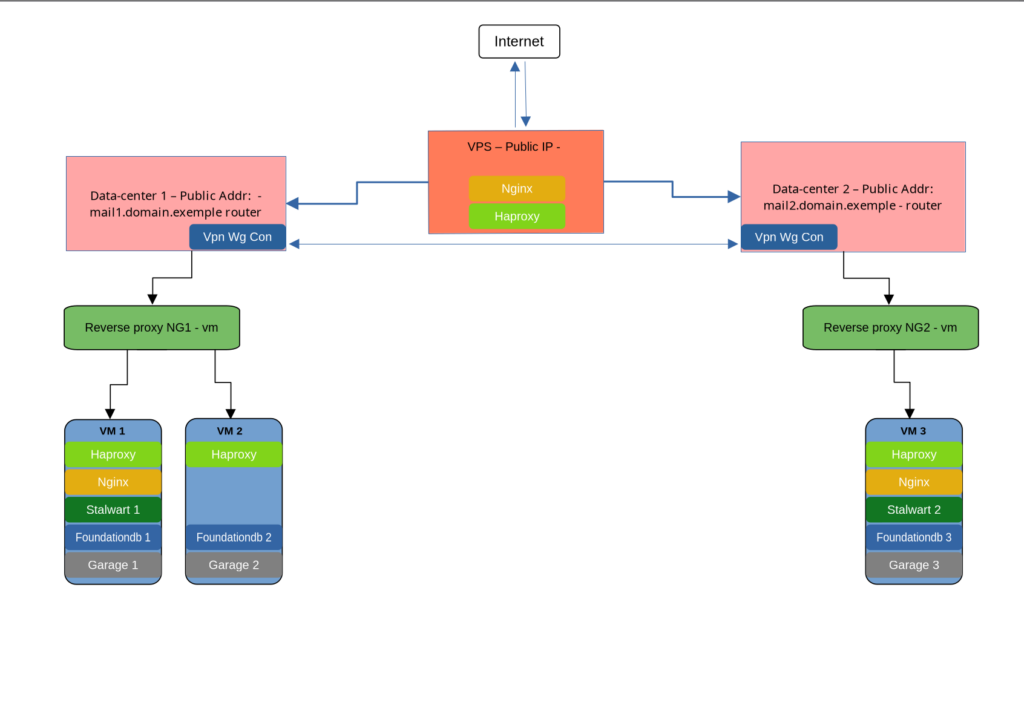
Local setup / nodes
node 1 192.168.50.60
node 2 192.168.50.61 #this node is used only for foundationdb /garage qvorum
node 3 192.168.55.60FoundationDB
Installing foundation db on each node
wget https://github.com/apple/foundationdb/releases/download/7.3.63/foundationdb-clients_7.3.63-1_amd64.deb
wget https://github.com/apple/foundationdb/releases/download/7.3.63/foundationdb-server_7.3.63-1_amd64.deb

dpkg -i foundationdb-clients_7.3.63-1_amd64.deb
dpkg -i foundationdb-server_7.3.63-1_amd64.deb

apt install -fSince this a demo setup I will not include any firewall setup, all nodes are reachable via lan /wireguard.
We need to configure the each configuration file on each node
nano /etc/foundationdb/fdb.cluster

Sd7w3EN2:orrtza3e@192.168.50.60:4500,192.168.50.61:4500,192.168.55.60:4500on each node do:
systemctl restart foundationdb
systemctl status foundationdb


fdbcli


 configure new ssd double
 configure resolvers=2 grv_proxies=2 commit_proxies=3 logs=3
 coordinators auto
exitThis is how it should look
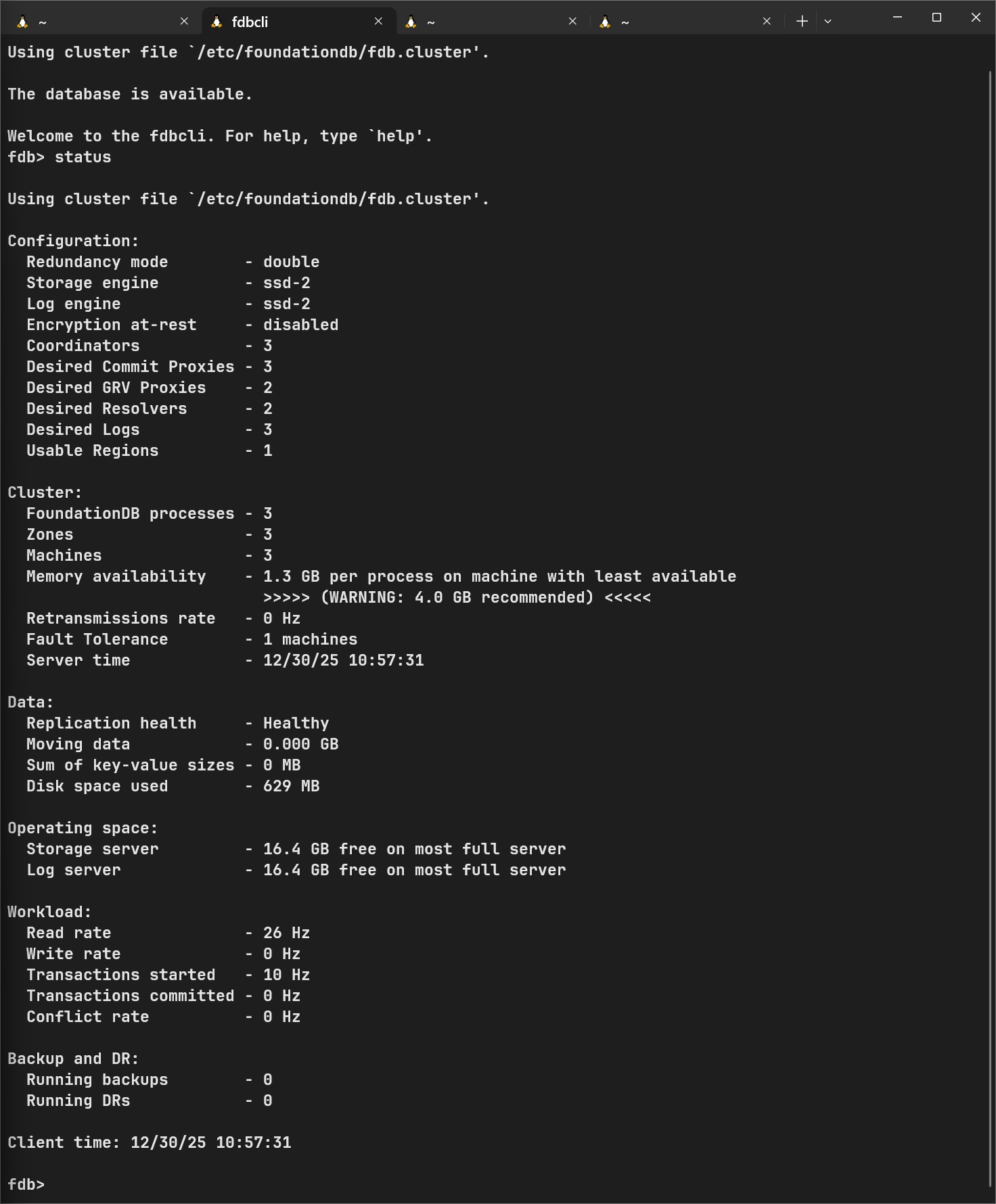
At this point, foundationdb is working as a cluster. Let’s make it work in stalwart. To install stalwart on linux see documentation here.
curl --proto '=https' --tlsv1.2 -sSf https://get.stalw.art/install.sh -o install.sh
sudo sh install.sh
First node configured with foundationdb
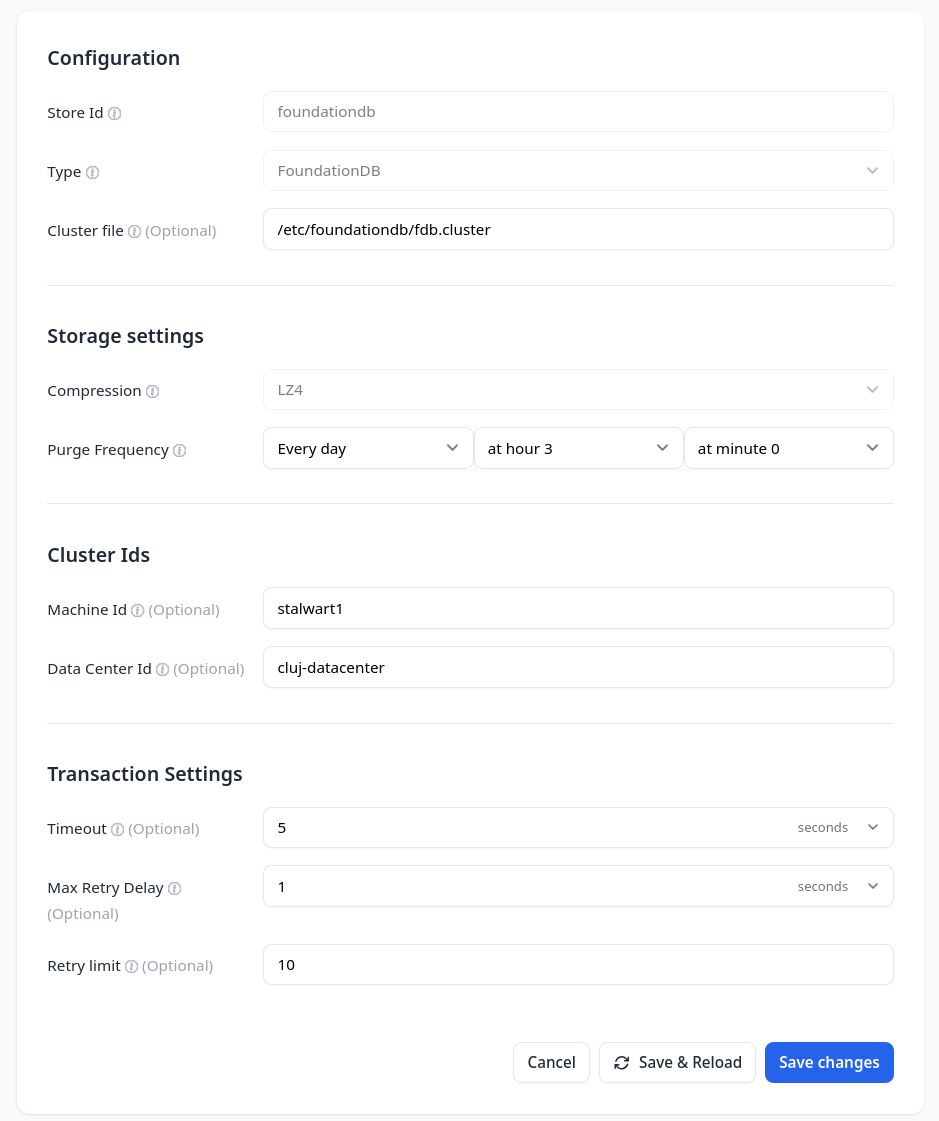
Second stalwart configured with foundationdb
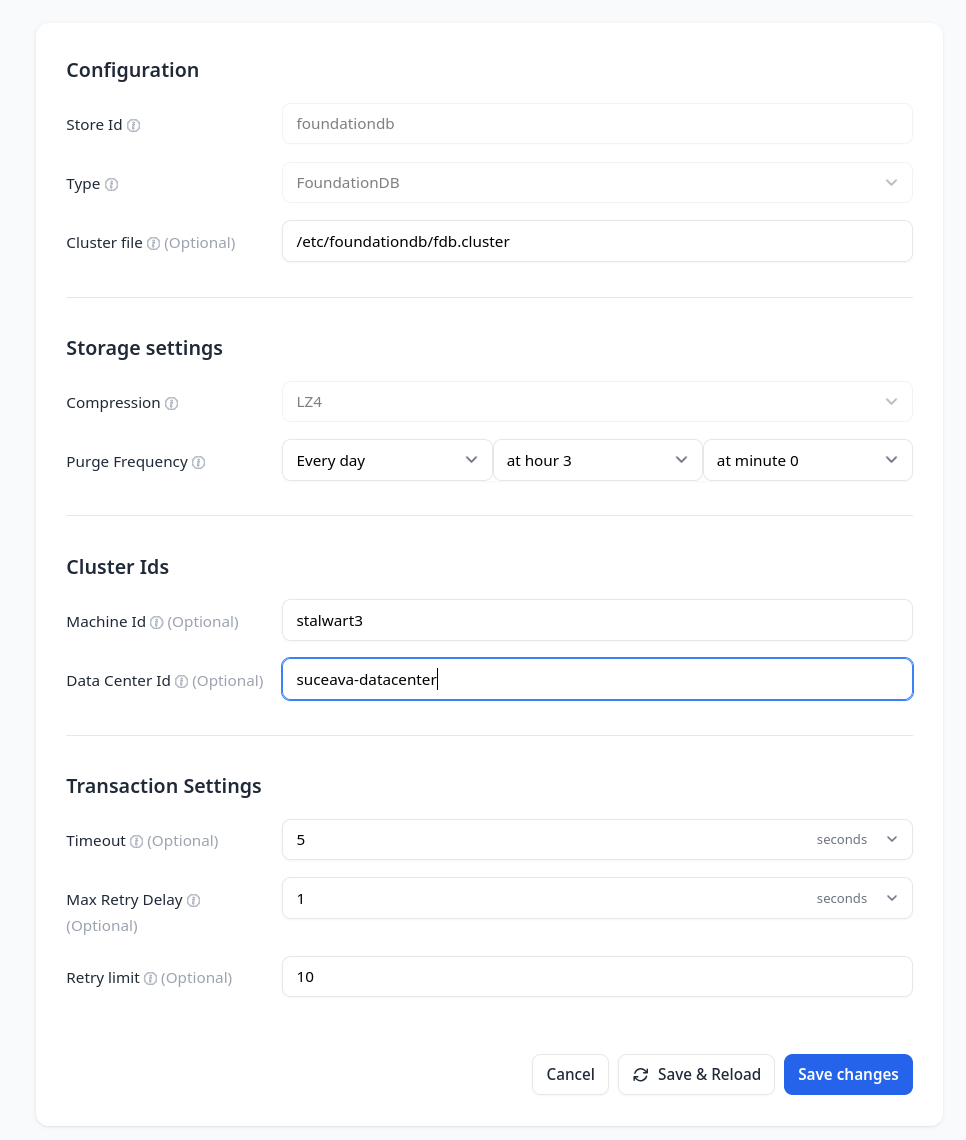
You could install multiple stalwart nodes with multiple public entry points, I installed and configured stalwart on two nodes with two public entry points.
Nginx on the VPS
Here is the nginx entry from mail.domain.example
   upstream mail_backend {
    least_conn;
    server mail1.domain.example:443 max_fails=1 fail_timeout=5s;
    server mail2.domain.example:443 max_fails=1 fail_timeout=5s;
}

server {
    listen 443 ssl http2;
    server_name mail.domain.example;

    ssl_certificate /etc/letsencrypt/live/mail.domain.example/fullchain.pem;
    ssl_certificate_key /etc/letsencrypt/live/mail.domain.example/privkey.pem;

    resolver 1.1.1.1 8.8.8.8 valid=30s;

    # Health check endpoint — only this path
    location /healthz/live {
        proxy_pass https://mail_backend/healthz/live;
        proxy_ssl_server_name on;
        proxy_ssl_verify off;

        proxy_set_header Host $host;
        proxy_set_header X-Real-IP $remote_addr;
        proxy_set_header X-Forwarded-For $proxy_add_x_forwarded_for;
        proxy_set_header X-Forwarded-Proto https;

        proxy_next_upstream error timeout invalid_header http_500 http_502 http_503 http_504;
        proxy_next_upstream_tries 2;
    }

    # Proxy everything else
    location / {
        proxy_pass https://mail_backend/;
        proxy_ssl_server_name on;
        proxy_ssl_verify off;

        proxy_set_header Host $host;
        proxy_set_header X-Forwarded-Proto https;
        proxy_set_header X-Forwarded-For $remote_addr;

        proxy_next_upstream error timeout http_500 http_502 http_503 http_504;
    }
}

server {
    if ($host = mail.domain.example) {
        return 301 https://$host$request_uri;
    }

    server_name mail.domain.example;
    listen 80;
    return 404;
}
In order to achieve a public load balancing at main address we need to public sub domains
mail1 and mail2
mail1.domain.example
mail2.domain.exampleThere are multiple reasons why I want each node to have its functional domain but one of the most important reason would be for monitoring. Haproxy would need to know right-away when nodes are down. For that I will use healthz/live (API)
https://mail1.domain.example/healthz/live
https://mail2.domain.example/healthz/liveHaproxy configuration on VPS
global
    log /dev/log local0
    log /dev/log local1 notice
    daemon
    user haproxy
    group haproxy
    stats socket /run/haproxy/admin.sock mode 660 level admin
    stats timeout 30s
    stats socket /var/run/haproxy.sock mode 600 level admin
    stats timeout 2m

defaults
    log global
    mode tcp
    option dontlognull
    option tcplog
    option redispatch
    log-format "%ci:%cp [%t] %ft %b/%s %Tw/%Tc/%Tt %B %ts %ac/%fc/%bc/%sc/%rc %sq/%bq"
    timeout connect 5s
    timeout client  2m
    timeout server  2m
    timeout check   5s
    retries 3

resolvers dns
    nameserver cloudflare 1.1.1.1:53
    nameserver google     8.8.8.8:53
    resolve_retries 3
    timeout resolve 1s
    timeout retry   1s
    hold valid 10s
    hold obsolete 5s

# =========================================================
# STATS PAGE
# =========================================================
listen stats
    bind *:8404
    mode http
    stats enable
    stats uri /stats
    stats refresh 30s
    stats show-legends
    stats show-node

# =========================================================
# HTTP HEALTH CHECK BACKENDS
# =========================================================
backend health_mail1
    mode http
    timeout check 3s
    timeout connect 2s
    timeout server 5s

    option httpchk
    http-check send meth GET uri /health/live/mail1 ver HTTP/1.1 hdr Host health.domain.example
    http-check expect status 200
    server mail1 health.domain.example:80 check inter 2s fastinter 1s downinter 1s fall 2 rise 2

backend health_mail2
    mode http
    timeout check 3s
    timeout connect 2s
    timeout server 5s

    option httpchk
    http-check send meth GET uri /health/live/mail2 ver HTTP/1.1 hdr Host health.domain.example
    http-check expect status 200
    server mail2 health.domain.example:80 check inter 2s fastinter 1s downinter 1s fall 2 rise 2

# =========================================================
# SMTP (25)
# =========================================================
frontend smtp_in
    bind *:25
    mode tcp
    option tcplog
    default_backend smtp_back

backend smtp_back
    mode tcp
    balance leastconn
    option tcpka
    option redispatch
    timeout connect 10s
    timeout server 60s
    retries 2

    server mail1 mail1.domain.example:25 track health_mail1/mail1 on-marked-down shutdown-sessions on-error mark-down resolvers dns send-proxy-v2
    server mail2 mail2.domain.example:2530 track health_mail2/mail2 on-marked-down shutdown-sessions on-error mark-down resolvers dns send-proxy-v2

# =========================================================
# SMTPS (465)
# =========================================================
frontend smtps_in
    bind *:465
    mode tcp
    default_backend smtps_back
    option tcplog

backend smtps_back
    mode tcp
    balance leastconn
    option tcpka
    option redispatch
    timeout connect 10s
    timeout server 60s
    retries 2

    server mail1 mail1.domain.example:465 track health_mail1/mail1 on-marked-down shutdown-sessions on-error mark-down resolvers dns
    server mail2 mail2.domain.example:465 track health_mail2/mail2 on-marked-down shutdown-sessions on-error mark-down resolvers dns

# =========================================================
# SUBMISSION (587)
# =========================================================
frontend submission_in
    bind *:587
    mode tcp
    default_backend submission_back
    option tcplog

backend submission_back
    mode tcp
    balance leastconn
    option tcpka
    option redispatch
    timeout connect 10s
    timeout server 60s
    retries 2

    server mail1 mail1.domain.example:587 track health_mail1/mail1 on-marked-down shutdown-sessions on-error mark-down resolvers dns
    server mail2 mail2.domain.example:587 track health_mail2/mail2 on-marked-down shutdown-sessions on-error mark-down resolvers dns

# =========================================================
# IMAPS (993)
# =========================================================
frontend imaps_in
    bind *:993
    mode tcp
    default_backend imaps_back
    option tcplog

backend imaps_back
    mode tcp
    balance leastconn
    option tcpka
    option redispatch
    timeout connect 10s
    timeout server 300s
    retries 2

    server mail1 mail1.domain.example:993 track health_mail1/mail1 on-marked-down shutdown-sessions on-error mark-down resolvers dns send-proxy-v2
    server mail2 mail2.domain.example:993 track health_mail2/mail2 on-marked-down shutdown-sessions on-error mark-down resolvers dns send-proxy-v2

# =========================================================
# HTTPS (443) - WEBMAIL / ADMIN
# =========================================================
frontend https_in
    bind *:443 ssl crt /etc/ssl/mail.domain.example.pem alpn h2,http/1.1
    mode http
    option forwardfor
    option http-server-close
    http-request set-header X-Forwarded-Proto https
    http-request set-header X-Forwarded-Port 443
    default_backend mail_backend

backend mail_backend
    mode http
    balance leastconn
    cookie SRV insert indirect nocache httponly secure
    option httpchk GET /healthz/live
    http-check send meth GET uri /healthz/live ver HTTP/1.1 hdr Host mail.domain.example
    http-check expect status 200
    timeout connect 3s
    timeout server 30s
    timeout check 2s
    retries 2

    server mail1 mail1.domain.example:443 ssl verify none check check-ssl cookie mail1 inter 2s fastinter 1s downinter 1s fall 2 rise 2
    server mail2 mail2.domain.example:443 ssl verify none check check-ssl cookie mail2 inter 2s fastinter 1s downinter 1s fall 2 rise 2
Garage nodes
==== HEALTHY NODES ====
ID                Hostname           Address             Tags                 Zone          Capacity  DataAvail        Version
3e46a878dd3f9223  node2-catauadrian  192.168.50.61:3901  [node2-catauadrian]  catatuadrian  20.0 GB   38.4 GB (72.9%)  v2.1.0
58a0da6daccbd4f1  node1-catauadrian  192.168.50.60:3901  [node1-catauadrian]  catatuadrian  20.0 GB   36.7 GB (69.8%)  v2.1.0
9b6bfbee87bf5222 node3 192.168.55.60:3901 [node3-catauadrian] catatuadrian 20.0 GB 37.2 GB (70.8%) v2.1.0A big challenge is to use a single public IP for sending all emails. That will solve the issue for IP reputation. I had to setup a wg connection from each node to VPS and use some nat rules.
/etc/wireguard/wg01.conf[Interface]
PrivateKey = hidden
Address = 172.19.19.2/32
Table = off
PostUp = ip route add 172.19.19.0/24 dev wg01
PostUp = iptables -t mangle -A OUTPUT -p tcp --dport 25 -d 192.168.0.0/16 -j RETURN
PostUp = iptables -t mangle -A OUTPUT -p tcp --dport 25 -d 172.16.0.0/12 -j RETURN
PostUp = iptables -t mangle -A OUTPUT -p tcp --dport 25 -d 10.0.0.0/8 -j RETURN
PostUp = iptables -t mangle -A OUTPUT -p tcp --dport 25 -j MARK --set-mark 0x19
PostUp = ip rule add fwmark 0x19 table smtp_route
PostUp = ip route add default via 172.19.19.1 dev wg01 table smtp_route
PostUp = ip rule add from 172.19.19.2 table smtp_route
PostUp = iptables -t nat -A POSTROUTING -o wg01 -p tcp --dport 25 -j SNAT --to-source 172.19.19.2
PostDown = iptables -t nat -D POSTROUTING -o wg01 -p tcp --dport 25 -j SNAT --to-source 172.19.19.2
PostDown = ip rule del from 172.19.19.2 table smtp_route
PostDown = iptables -t mangle -D OUTPUT -p tcp --dport 25 -d 192.168.0.0/16 -j RETURN
PostDown = iptables -t mangle -D OUTPUT -p tcp --dport 25 -d 172.16.0.0/12 -j RETURN
PostDown = iptables -t mangle -D OUTPUT -p tcp --dport 25 -d 10.0.0.0/8 -j RETURN
PostDown = iptables -t mangle -D OUTPUT -p tcp --dport 25 -j MARK --set-mark 0x19
PostDown = ip rule del fwmark 0x19 table smtp_route
PostDown = ip route flush table smtp_route
PostDown = ip route del 172.19.19.0/24 dev wg01
[Peer]
PublicKey = Hidden
Endpoint = VPS IP here:52824
AllowedIPs = 0.0.0.0/0
PersistentKeepalive = 25
On vps, this is very important, paste the content at the very top before any filter rules, I use ufw:
nano /etc/ufw/before.rules# -------------------
# NAT rules (MASQUERADE)
# -------------------
*nat
:POSTROUTING ACCEPT [0:0]
-A POSTROUTING -s 172.19.19.0/24 -o eth0 -j MASQUERADE
COMMIT
Add two forwarding rules for port 25
sudo ufw route allow proto tcp from any to any port 25 on eth0
sudo ufw route allow in on wg01 from any to anyTesting node1 traffic via wg
root@node1-catauadrian:~$ ping -c 3 8.8.8.8 -I 172.19.19.2

PING 8.8.8.8 (8.8.8.8) from 172.19.19.2 : 56(84) bytes of data.
64 bytes from 8.8.8.8: icmp_seq=1 ttl=116 time=76.1 ms
64 bytes from 8.8.8.8: icmp_seq=2 ttl=116 time=47.7 ms
64 bytes from 8.8.8.8: icmp_seq=3 ttl=116 time=46.5 ms

--- 8.8.8.8 ping statistics ---
3 packets transmitted, 3 received, 0% packet loss, time 2002ms
rtt min/avg/max/mdev = 46.494/56.769/76.090/13.670 ms
Testing node3 traffic via wg
root@node3:~$ ping -c 3 8.8.8.8 -I 172.19.19.3
PING 8.8.8.8 (8.8.8.8) from 172.19.19.3 : 56(84) bytes of data.
64 bytes from 8.8.8.8: icmp_seq=1 ttl=116 time=45.3 ms
64 bytes from 8.8.8.8: icmp_seq=2 ttl=116 time=46.1 ms
64 bytes from 8.8.8.8: icmp_seq=3 ttl=116 time=45.8 ms

--- 8.8.8.8 ping statistics ---
3 packets transmitted, 3 received, 0% packet loss, time 2002ms
rtt min/avg/max/mdev = 45.300/45.723/46.092/0.325 ms
Note: I anonymized the public addresses and after many tests and I could complete turn off one vm, stop the foundationdb, cut the internet at one location and still could have a working send / receive email service, the user could not notice any change or interruption. As far foundationdb and garage s3, I think they are best combination with stalwart compared with a traditional database like (postgresql or mariadb). No problem with foundationdb data after reboots, no manual intervention and I got consistent data.
